Allow local non-admin users to change network settings
To be able to change network settings, users must be in the local group called Network Configuration Operators. If the system is not domain-joined, you simply have to add a user to this group.
Allow local non-admin users to change network settings in a domain-joined system
There is no direct way to allow a user to change network settings. Domain users must be added to the local group Network Configuration Operators.
Below are the steps to add users to the local group via Group Policy.
- Create a Security Group with your desired name.
- Create a GPO under your desired OU.
- Edit the GPO and navigate to
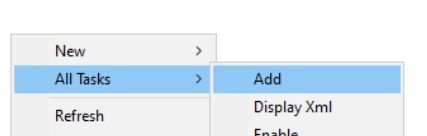
Computer Configuration → Preferences → Control Panel Settings → Local Users and Groups. - Right click in the windows →
All Tasks → Add.
- Select “Update” as an action. Use the dropdown for Group name and choose
Network Configuration Operators (built-in).
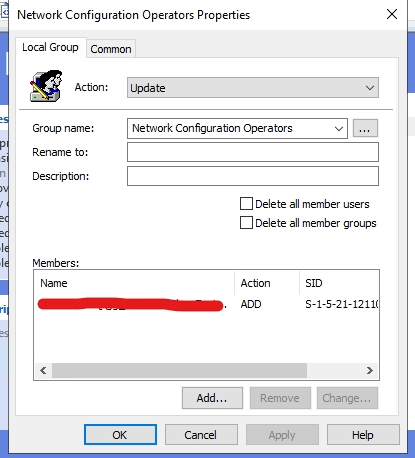
- In members, select the Security Group that you created in Step 1.
- Save everything and on your target computer, do a
gpupdate /force. You may be required to restart.